> For the complete documentation index, see [llms.txt](https://docs.v2raytun.com/llms.txt). Markdown versions of documentation pages are available by appending `.md` to page URLs; this page is available as [Markdown](https://docs.v2raytun.com/overview/supported-headers.md).
# Supported headers
v2RayTun supports different headers that can be sent by subscription servers
Preview
## To know:
* v2RayTun supports HTTP headers and body headers
* v2RayTun supports base64 encoded and raw body headers
## profile-title
Subscription name shown in the application
v2RayTun supports two formats:
* **Raw string**
* **Base64 Encoded string** (must starts with `base64:` prefix)
#### Examples:
```
profile-title: "MyVPN"
profile-title: "base64:8J+agCBNeVZQTg=="
```
## subscription-userinfo
Information about the subscription, how much traffic has been used, how much maximum traffic, when the subscription ends
**Supported values:**
* upload
* download
* total
* expire
#### Examples:
```
subscription-userinfo: "upload=0; download=100000; total=2000000; expire=1749954800"
subscription-userinfo: "expire=1749954800"
```
It is not necessary to pass all parameters.
## profile-update-interval
The time interval when to renew your subscription. For example, once an hour
**Important! The value is taken in hours**\
**If you passed `profile-update-interval: 1`**\
**This means that the subscription will be updated every hour.**
#### Examples:
```
profile-update-interval: "1"
profile-update-interval: "12
```
## routing
v2RayTun can automatically use always shared routing for this subscription.
#### Examples:
{% code overflow="wrap" %}
```
routing: "eyJkb21haW5TdHJhdGVneSI6IkFzSXMiLCJpZCI6IjFFQUE4OEJCLUI1RjUtNEY2OS04MkQwLTlGRjQ0OTkwODc5NCIsImJhbGFuY2VycyI6W10sImRvbWFpbk1hdGNoZXIiOiJoeWJyaWQiLCJydWxlcyI6W3siZG9tYWluIjpbInJlZ2V4cDouKlxcXFwucnUkIiwiZ2Vvc2l0ZTpjYXRlZ29yeS1ydSJdLCJpZCI6IjlDQTYyQzY5LTNEN0EtNEZFNS05RTE5LTIxODlFMkU0ODUzRSIsIm91dGJvdW5kVGFnIjoiZGlyZWN0IiwidHlwZSI6ImZpZWxkIiwiX19uYW1lX18iOiJEaXJlY3QgUnVzc2lhIiwiaXAiOlsiZ2VvaXA6cnUiXX1dLCJuYW1lIjoiRXhhbXBsZSJ9"
```
{% endcode %}
#### How to get the base64 encoded routing?
Step 1
Step 2
Step 3
The final result should be something like that: "eyJkb21haW5...."\
This value you have to pass into `routing` header
#### To know:
1. The routing passed to the subscription will be used over the routing configured in the application and Direct Service.
2. The routing should be exactly as you got from application
3. If subscriptions routing using, you'll get message in app logs about that
## announce
Announcements allow VPN services to notify a specific user or all users. You can come up with whatever you want
v2RayTun supports two formats:
* **Raw string**
* **Base64 Encoded string** (must starts with `base64:` prefix)
**v2RayTun also supports colored text for announce, you can color the text in any RGB color**\
**if you pass #RRRGGBB before the beginning of the word**
You can also customize the link that will open when you click on the announcement text.\
See [announce-url](#announce-url)
#### Examples:
```
announce: "🚀 Our servers got a #27e8d5performance boost to #e8cb27lighting speed!"
announce: "base64:8J+agCBPdXIgc2VydmVycyBnb3QgYSAjMjdlOGQ1cGVyZm9ybWFuY2UgYm9vc3QgdG8gI2U4Y2IyN2xpZ2h0aW5nIHNwZWVkIQ=="
```
## announce-url
The user can open the link you passed when they click on the announcement text
#### Examples:
```
announce-url: "https://t.me/v2raytun"
```
## update-always
Force subscription renewal every time a user logs into the app.
To know:
* If you enable this parameter, v2RayTun will ignore[ profile-update-interval](#profile-update-interval)
* The user's subscription will be updated every time they log into the app, but provided they have VPN disabled.
#### Examples:
```
update-always: "true"
```
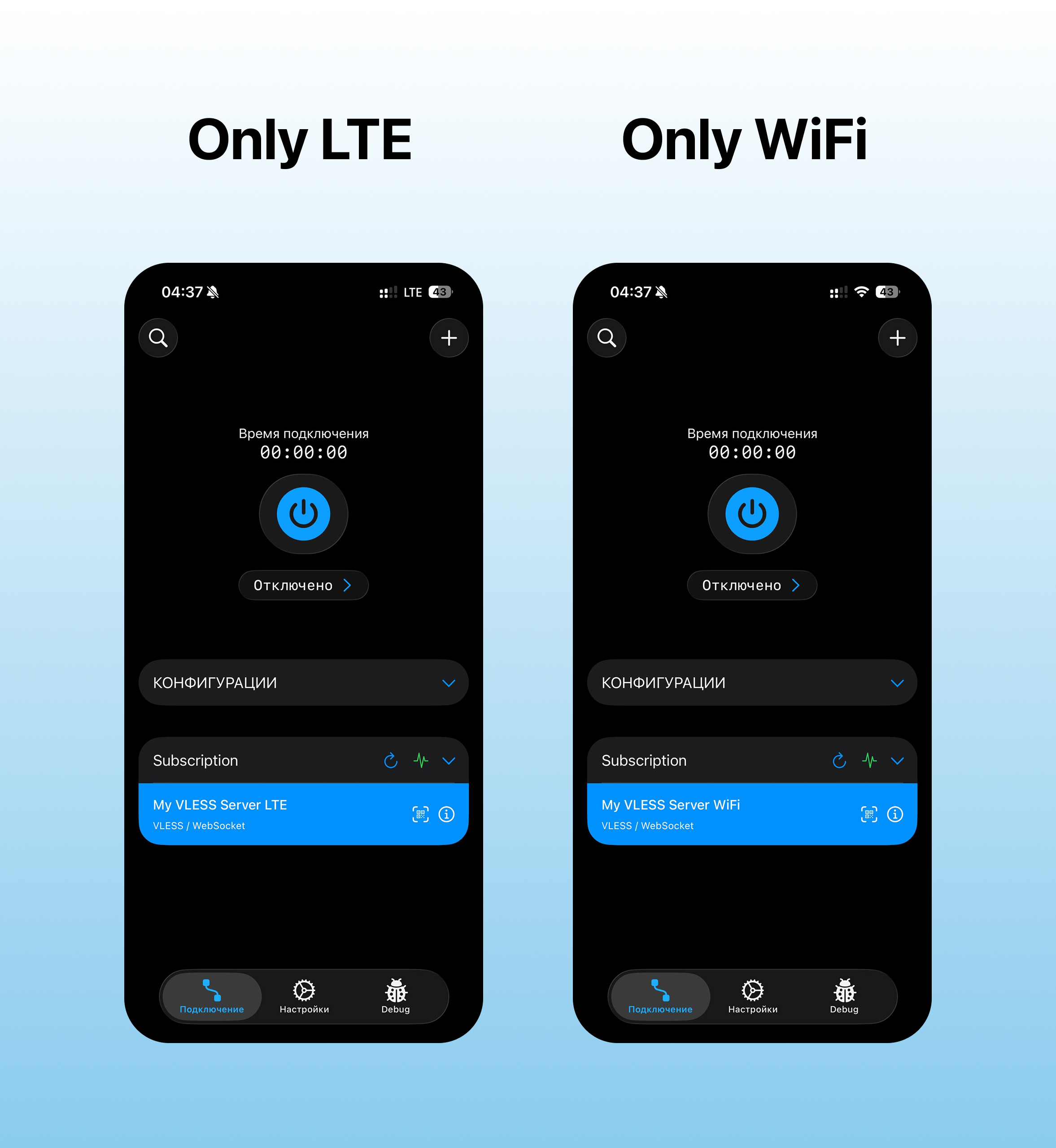
## network-filter
An optional subscription header that controls whether configurations are shown based on the user's network type.
When set to `true`, the client filters configurations by their names:
* Configurations containing `LTE` or `Only mobile` are shown only on mobile networks
* Configurations containing `WiFi` or `Only Wifi` are shown only on Wi-Fi
* Other configurations are always shown
If the header is missing or set to `false`, no filtering is applied.